 By Gustavo Torres
AWS Lambda is the service from Amazon's cloud, Amazon Web Services (AWS), that runs your code without you needing a server of your own. You upload a file with your code and get a web address in return. Whenever a request reaches that address, AWS runs the code on one of its machines and sends back whatever it answers. AWS calls the whole upload a function, even though there may be more inside it. In Python, the only thing you have to supply is an ordinary function, the handler, which Lambda calls once per request. Everything else in the file runs once, ahead of the handler, when Lambda prepares a copy of the code to serve requests. This article calls that copy an instance.
Here's the file I uploaded. The top part, which runs when the instance starts, generates an
identifier (INSTANCIA, Spanish for "instance") and records the time (CREADA, "created"). The
handler, lambda_handler, counts how many requests that instance has served (llamadas, "calls")
and returns that count along with the identifier and the instance's age in seconds (edad_s). The
espera ("wait") parameter comes in later: add it to the address (?espera=1) and the function
sleeps for that many seconds before answering.
import time
import uuid

# This runs only once, when the instance starts.
INSTANCIA = uuid.uuid4().hex[:8]
CREADA = time.time()
llamadas = 0


def lambda_handler(event, context):
    # And this, on every request.
    global llamadas
    llamadas += 1
    espera = float((event.get("queryStringParameters") or {}).get("espera", 0))
    time.sleep(espera)
    return {"instancia": INSTANCIA, "llamadas": llamadas,
            "edad_s": round(time.time() - CREADA, 1)}
I called the function twice in a row from my laptop with curl, using its -w option to print the
total time of each request, from the start of the connection to the last byte of the response:
$ curl -s -w '  %{time_total} s\n' https://…lambda-url.eu-west-1.on.aws/
{"llamadas":1,"instancia":"f6bbe1bf","edad_s":0.0}  0.508480 s
$ curl -s -w '  %{time_total} s\n' https://…lambda-url.eu-west-1.on.aws/
{"llamadas":2,"instancia":"f6bbe1bf","edad_s":0.3}  0.254230 s
The first request took 0.51 s, and the second took half that. The same instance served both: the
identifier, f6bbe1bf, is identical, and its counter went from 1 to 2. Lambda also writes one
line to its log for every request, with what it measured on the inside, and that's where the
difference shows (trimmed):
Duration: 2.40 ms   Billed Duration: 115 ms   Init Duration: 111.69 ms
Duration: 1.55 ms   Billed Duration: 2 ms
Duration is the time the handler took: about 2 ms both times. Init Duration appears only on
the first line, because f6bbe1bf didn't exist before that request and Lambda had to build it: a
small virtual machine, a Python interpreter and the top-level code that generates the identifier
(112 ms). Billed Duration is what I was charged for: 115 ms the first time and 2 ms the second.
There was more work before all that, which the log doesn't even mention. By the second request,
the instance was already waiting.
That is the whole idea in miniature. Serverless doesn't remove servers. It removes the decision of how many to keep running, and it bills you only for the time they spend working. The catch is that a server is born when a request arrives and dies when the requests stop, so your code has to be written for a machine that may not exist at any given moment. Everything else follows from that: the misleading name, the problem it solves, the cold start, what changes in your code, and the point at which it costs more than a good old server.
The word server has two meanings, and it helps to keep them apart. One is the machine, physical or virtual, with its processor, memory and operating system. The other is the program that waits for requests and answers them, such as a web server. A Lambda instance is both in miniature: a running copy of your code and the machine underneath it. What's missing is anyone on your side who switches it on, sizes it or shuts it down.
Every result in this article was measured. Examples that aren't shown in full link to their code,
and a script creates the functions in an AWS account,
calls them, reads their logs and deletes everything at the end, so anyone can repeat the
experiments. The measurements were taken on 17 October 2026 in the Ireland region (eu-west-1),
with Python 3.14 and 128 MB of memory unless I say otherwise.
The problem: paying for a machine that mostly waits
With a traditional server, rented or your own, you decide up front how much machine you need. Size it for normal traffic and it falls over on the day of the spike. Size it for the spike and you pay for a machine that sits waiting the rest of the time. And traffic is rarely flat: there's day and night, weeks with a campaign and weeks without, and plenty of applications go hours without a single request.
This isn't unusual. When Luiz André Barroso and Urs Hölzle at Google measured more than 5,000 servers over six months, the machines spent most of their time running at between 10 and 50% of their capacity: almost never idle, almost never full. At the other end, among small applications, Microsoft studied two weeks of real traffic on its functions service and found that 45% of applications were invoked once an hour or less, on average. With one server per application, nearly all that hardware would be switched on for nothing.
The second problem is the work of running it. A server has to be installed, its operating system updated and its security holes patched. Someone has to make sure the disk doesn't fill up, and someone has to decide when to add another machine. Much of that can be automated (cloud autoscaling starts virtual machines when the load goes up), but someone has to design the automation, and a new virtual machine still takes minutes to be ready.
It's worth keeping the two problems apart, paying for idle capacity and operating machines, because serverless tackles both and doesn't solve them equally well.
Where it came from
Starting code only when a request arrives is almost as old as the web. In 1993,
CGI (Common Gateway Interface), introduced with
the NCSA web server, let any program generate a page. For every request, the web server started a
new process, handed it the data, collected what it printed and let it die. That was simple but
slow, because starting a process per request is expensive. In 1996, FastCGI fixed the slowness by
doing the opposite and keeping the process alive between requests. It's the same dilemma we saw
with instance f6bbe1bf, thirty years earlier.
In 2006, Amazon launched EC2 (Elastic Compute Cloud), the AWS service that rents out virtual machines by the hour: computers simulated in software, which share a physical server with others without seeing one another. You no longer had to buy hardware, but there were still machines. You chose them, administered them and paid for them while they were switched on, whether they were working or not. In 2008, Google App Engine went a step further: you uploaded your Python application and Google decided how many copies to run. That model is called PaaS (Platform as a Service), as opposed to EC2's IaaS (Infrastructure as a Service), and it cost you some freedom: App Engine supported only certain languages and, for example, wouldn't let you write to disk.
Around 2011, Parse and Firebase gave mobile apps a ready-made backend: a database, user accounts and notifications behind an API, with no server code to write. That's BaaS (Backend as a Service). Then, in 2012, Ken Fromm of Iron.io, a company that sold queues and processing in the cloud, wrote the article that popularised the word serverless. The text itself warned that the word didn't mean there were no servers, only that developers no longer had to think about them.
On 13 November 2014, Amazon unveiled a preview of AWS Lambda. It supported only Node.js, and functions were triggered by events from other AWS services, such as a new file in S3, Amazon's file store, or a change to a table in DynamoDB, its database. What was new wasn't running other people's code, which App Engine already did. It was the unit of work: there were no instances to configure or pay for, only a function that runs when an event happens, billed by request and by execution time in 100 ms slices. If nothing happened, it cost nothing. In July 2015, API Gateway put a web address in front of functions, which meant you could build an entire API with them. Google Cloud Functions and Azure Functions followed in 2016.
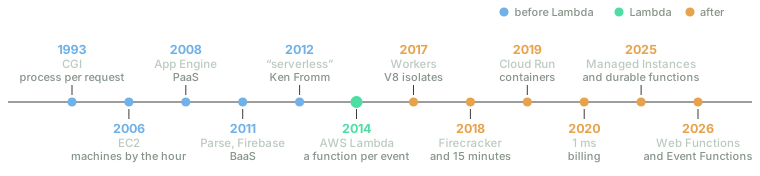
Not to scale. Lambda didn't invent running other people's code; it invented charging for it per request and per millisecond, with no instances in sight.
What "serverless" means, and what it doesn't
The name is deliberately misleading. Lambda functions run on a fleet of AWS servers, each of which hosts many functions from many customers at once. What disappears isn't the machine but the machine as something you choose, size, patch and pay for by the hour. Ken Fromm said as much in 2012, and Mike Roberts, in the standard text on the subject, sums it up the same way: the servers are still there, but someone else manages them.
It's more useful to define serverless by how it behaves than by what it runs on. A service is serverless if it meets four conditions:
- You don't provision or administer machines. You don't choose a server size, an operating system or how many copies to run.
- It scales with demand by itself, all the way down to zero. Ten simultaneous requests mean ten instances; no requests mean none.
- You pay for use, not for reserved capacity. Requests, milliseconds, bytes stored.
- Instances are ephemeral. Since they can be born and die at any moment, you can't keep anything important in them.
The last one isn't a promise but a consequence of the other three, and it's the one that changes how you program the most. The 2019 Berkeley report, which settled much of the vocabulary, compares the leap to moving from assembly language to a high-level language: the programmer stops managing a resource (registers then, machines now) and the system does it instead.
Several terms have grown up around the word, and they often get confused:
| Term | What you manage | How you pay | Scales to zero? |
|---|---|---|---|
| IaaS: virtual machines (EC2) | Operating system, program, scaling and code | By the hour while it's on | No |
| PaaS: a platform that runs your application (Heroku, App Engine) | Code and, often, how many copies | Per instance per hour | It depends |
| FaaS: functions triggered by events (Lambda, Cloud Functions) | Code | Per request and millisecond | Yes |
| BaaS: ready-made services that replace some of your code (Firebase, Auth0) | Configuration | By use | Yes |
| Serverless containers (Cloud Run, Fargate) | The container image | By use or per task | Cloud Run yes, Fargate no |
| Edge functions: code close to the user (Cloudflare Workers) | Code | Per request and CPU | Yes |
FaaS (Function as a Service) and BaaS are the two original pillars of the term, which is why "serverless" and "Lambda" are sometimes used as synonyms, although they aren't. A container is a way of packaging a program with everything it needs to run (its libraries, its configuration) and isolating it from the other programs on the machine. Cloud Run runs containers when requests arrive and shuts them down when the requests stop. Fargate also runs containers without you ever seeing a machine, but it bills for as long as the task is running, whether or not requests are coming in. This is where serverless-washing begins: calling anything that hides a machine serverless, even if it doesn't scale to zero or bill by use.
The line between serverless and PaaS is the blurriest, and the best test is still the one Roberts credits to Adrian Cockcroft: if a platform can start instances in 20 ms and have them run for half a second, it deserves to be called serverless. What separates Lambda from Heroku isn't the code you upload but the granularity: instances born for a single request, and a bill that goes down to the millisecond.
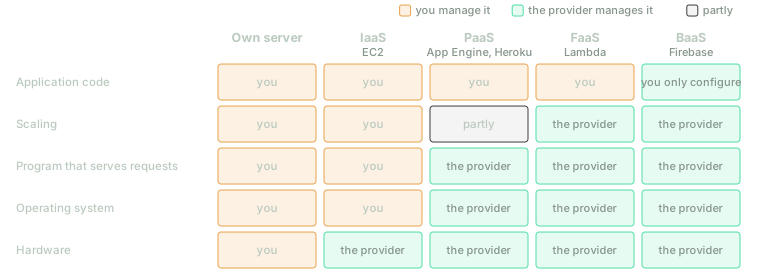
From left to right, the provider takes over more layers. Serverless begins where you stop deciding how many machines there are.
How it works under the hood
To show the mechanism I'll use Lambda, because it's the best-documented platform and AWS has published how it's built inside. Since 12 October 2026, AWS has called these classic functions Lambda Event Functions, to set them apart from a new product I'll come to at the end. Other platforms work in similar ways, and I'll point out the differences as we go.
One function, one event
The handler from the start takes two arguments, event and context. The event is a JSON
document describing what happened, and the context carries details of the invocation, such as
its identifier or the memory available. What happened might be an HTTP request arriving through a
Function URL (the free web
address Lambda provides, like the one at the start) or through API Gateway, a file uploaded to S3,
a message in a queue, or a timer that fires every hour.
Invocations come in two kinds. In a synchronous one, the caller waits for the response, as with an HTTP request. In an asynchronous one, Lambda puts the event in a queue of its own, replies straight away to say it has received it, and runs the function later, retrying if it fails. Both kinds matter further on.
The first request: the cold start
When a request arrives, Lambda looks for an instance of that function that is already prepared and free. AWS calls these execution environments, and the Firecracker paper calls them slots: spaces on an AWS server, each dedicated to a single function and handling one request at a time, that get reused for many requests in a row. If one is free, the request goes to it. If not, Lambda creates one: it picks a server, boots a minimal virtual machine on it, copies your code across, and starts the Python interpreter and everything outside the handler. Only then does it call the handler. That preparation is the cold start; a request that finds an instance ready is a warm request.
When the request is done, Lambda freezes the instance: it pauses its processes and keeps it,
memory and all, in case another request comes along. The documentation describes this in its
account of the lifecycle,
which has three phases: Init (preparing), Invoke (serving each request) and Shutdown (dying).
I forced twenty cold starts of the function from the start (changing a function's configuration makes Lambda throw away its existing instances) and followed each with three warm requests. The medians:
| Cold start | Warm request | |
|---|---|---|
| Total time, as seen from the laptop | 0.51 s | 0.24 s |
| … of which, opening the connection (TCP and TLS) | 0.17 s | 0.17 s |
| … from the connection to the first byte of the response | 0.33 s | 0.08 s |
Init Duration: preparing the instance, according to Lambda | 116 ms | (none) |
Duration: the handler | 2.3 ms | 1.7 ms |
Billed Duration: what gets charged | 119 ms | 2 ms |
Opening the encrypted connection to Ireland costs the same either way, and the 80 ms the warm
request spends after that are almost all network time: the handler itself works for less than
2 ms. The cold start adds about 250 ms on the server side. Of those, 116 ms are the Init that
Lambda logs (starting Python and importing the file); the other 130 or so are what happens before
that, creating the virtual machine and putting the code in place, and none of it appears in the
log.
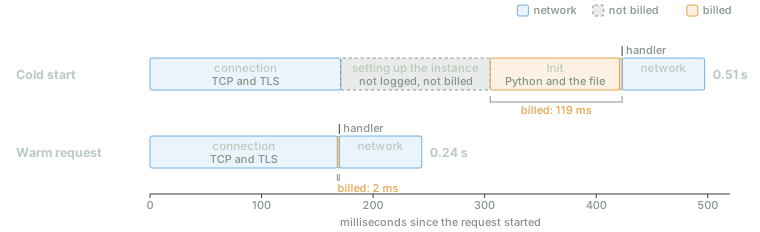
Medians of twenty cold starts and sixty warm requests. Since August 2025 the Init is billed; what happens before it isn't.
That Init is billed. Until 1 August 2025 it wasn't, for functions like this one (a .zip package
in one of the languages AWS manages). Since then,
it's billed like everything else,
which is why the first request cost 119 ms and the second 2 ms. What happens before the Init is
still free.
What makes the start slower
Whatever you do in the Init, you pay for on every new instance, in both time and money. I
measured ten cold starts for each of four variants of the same function:
| Variant | Package | Init | Until the first byte |
|---|---|---|---|
| The function as it is | 440 bytes | 114 ms | 0.35 s |
… plus import boto3 (AWS's Python library) | 479 bytes | 364 ms | 0.58 s |
| … with pandas in the package, not imported | 43 MB | 113 ms | 0.58 s |
| … with pandas, imported | 43 MB | 2,821 ms | 3.27 s |
Importing boto3, which comes preinstalled on Lambda, costs a quarter of a second. Importing
pandas, Python's data-table library, costs nearly three seconds. And
a big package costs you even if you never use it: 43 MB that nobody imports leave the Init
untouched but delay the response by about 200 ms, the time it takes to put the code in place
before anything starts. That time shows up neither in the log nor on the bill, but the user waits
for it. With 1769 MB of memory the figures are the same: memory, which on Lambda determines how
much CPU you get (more on that below), doesn't speed up the start. AWS doesn't document why.
Those three seconds of pandas have a story behind them. On my laptop, import pandas takes 0.5 s.
On Lambda it takes 2 s, even with the instance warm and the files already read. The cause lies in
the .pyc files, where Python keeps code it has already compiled so that it doesn't have to
compile it again every time. Each .pyc records the modification time of its source file, and
Python uses it only if that time matches. But the .zip format stores times in local time, with
no time zone and only two-second precision, and Lambda reads them as UTC. My laptop is on UTC+2,
so on Lambda every pandas file looked two hours newer than its .pyc. Python discarded them all
(pandas alone has 1,421) and recompiled the entire library. On a normal server that would happen
once: Python would save the new .pyc files and the next start would be fast. On Lambda the code
directory is read-only, so what a server does once, Lambda repeats on every new instance.
The fix is an option available since Python 3.7 (PEP 552):
compile the .pyc files so that they're validated against a hash of the source code instead of
its modification date.
python -m compileall -q -f --invalidation-mode unchecked-hash package/With that, the pandas Init drops from 2.7 s to 1.0 s, and the full response from 3.3 s to 1.7 s.
The general lesson isn't about pandas. In a function, everything that runs at start-up runs many
times, so what would be a one-off nuisance on a server becomes a fixed part of both the latency
and the bill.
How long an idle instance lives
If instances are kept between requests, for how long? AWS doesn't say. The documentation says only that it keeps an instance "for some time" in case another invocation comes, and that it replaces every instance after a few hours anyway, even if requests never stop.
So I measured it. I created fifteen copies of the function from the start, each with its own fixed
gap between 1 and 90 minutes, and for five or six hours each one repeated the same cycle: call the
function, wait out the gap without sending it a single request, then call it again. If the same
instance answers (the same identifier), it survived the gap; if a different one does, Lambda had
retired it. Each copy is a separate function, so their instances never mix, and each probe is
counted by the gap it actually had, as measured on the laptop
(the experiment, medir.py vida, where vida means
"life").
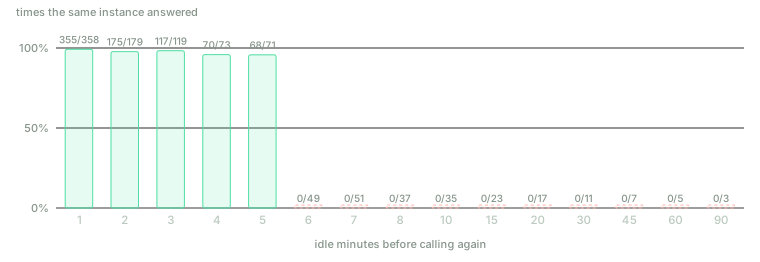
Fifteen functions, each called with a fixed gap for five or six hours. With up to five minutes without requests the instance is nearly always still there; from six minutes on, never.
The cut-off is sharp. With five minutes or less without requests, the same instance answered 785 times out of 800. With six or more, it never did, in 238 tries. The boundary sits right there: at five minutes it survived 68 times out of 71, and at six, 0 out of 49. On my account, in this region and on this day, Lambda retires an instance that has been idle for between five and six minutes.
On fifteen occasions an instance disappeared after a wait of five minutes or less. Ten of those were instances more than two hours old, between 123 and 144 minutes, that received a request every few minutes and were never idle. That's the documentation's replacement "every few hours", which here came a little after the two-hour mark: no instance lived past 144 minutes, however much work it had. The other five were younger instances, and there's no cause visible from the outside.
Neither number is documented, so AWS can change them whenever it likes, and you shouldn't build anything that depends on them. Still, they explain when cold starts happen. A function with steady traffic hardly ever has one: AWS reckons they affect under 1% of invocations. A function that gets a request every ten minutes has one every time.
One request per instance: how it scales
Each Lambda instance serves only one request at a time, so if ten arrive at once, ten instances
are needed. I sent several batches of requests to the function from the start, asking it to sleep
for a second on each one (the espera parameter) so that they would overlap:
| Batch | Responses | Distinct instances | Cold starts |
|---|---|---|---|
| 10 requests, one after another | 10 | 1 | 1 |
| 10 at once | 10 | 10 | 10 |
| Another 10 at once, right after | 10 | 10 (the same ones) | 0 |
| 20 at once | 10, and 10 rejected | 10 | 0 |
| 10 one after another | 10 | 1 | 0 |
Ten requests in a row are served by a single instance, which gets reused. Ten at once create ten
instances, each with its own cold start, and the next batch reuses all of them. Twenty at once run
into a limit: my account is new, so it can have only ten instances running at the same time, and
Lambda rejected the other ten in 0.3 s with a 429 error (Rate Exceeded). AWS's default is
1,000, but new accounts
start lower and get it raised as they're used.
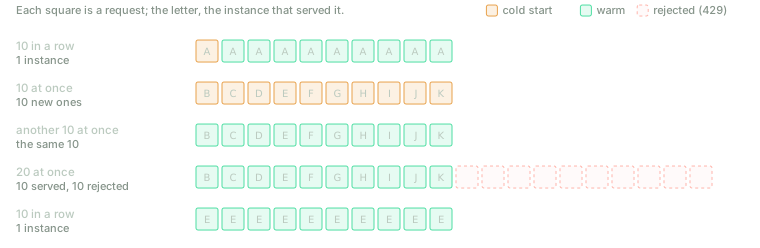
One instance per request in flight, and never two requests in the same instance. The account limit is on the number of instances at a time, not on requests per second.
That's why the figure that matters on Lambda is concurrency: requests per second multiplied by the seconds each one lasts. A hundred requests per second that take 50 ms need about five instances. A hundred per second that wait a second on a database need a hundred. Waiting ties up a whole instance, even though it isn't using the CPU.
One virtual machine per function
Your code runs on the same physical servers as other AWS customers' code, so keeping them isolated from one another comes first. Originally, Lambda put functions in containers, and each customer's containers in separate virtual machines. The team didn't like this: a container shares the operating system's kernel with the other programs on the machine, and a bug in that kernel breaks the isolation. A full virtual machine doesn't share a kernel, but creating one per function was too heavy.
The answer was Firecracker, released in 2018: a virtual machine monitor trimmed to the bone, with no BIOS and none of the devices a function doesn't need. According to the paper that describes it, each microVM takes up less than 5 MB on top of the function's own memory, boots to application code in under 125 ms, and a single server can create up to 150 of them per second. Each Lambda slot is one of these. Booting it and copying the code across is what happens in the 130 unlogged milliseconds of the earlier measurement, although AWS doesn't say how long each part takes.
Cloudflare went the other way. Workers doesn't create a virtual machine per function but an isolate of V8, Chrome's JavaScript engine: many isolated programs inside a single process, like the tabs of a browser. They start in about 5 ms, and thousands fit in one process, at the price of running only JavaScript and WebAssembly. It's the usual trade-off: give up some isolation and compatibility and you get a faster start.
How you're billed
Lambda charges for two things: $0.20 per million requests, and execution time multiplied by the configured memory, measured in GB-seconds. A 1 GB function that works for one second uses one GB-second, which in Ireland costs $0.0000166667 (20% less on Arm processors). Each month, the first million requests and the first 400,000 GB-seconds are free.
Memory is the lever that moves everything, because Lambda allocates CPU in proportion to it: at 1769 MB you get the equivalent of one whole virtual processor (vCPU), and at 128 MB, fourteen times less. I ran the same job, 300,000 chained SHA-256 hashes in pure Python, at different memory sizes (cpu/lambda_function.py):
| Memory | Time (median of 5) | GB-seconds per call | Cost per million calls ($) |
|---|---|---|---|
| 128 MB | 3.11 s | 0.39 | 6.73 |
| 256 MB | 1.53 s | 0.39 | 6.65 |
| 512 MB | 0.78 s | 0.40 | 6.86 |
| 1024 MB | 0.41 s | 0.42 | 7.15 |
| 1769 MB | 0.23 s | 0.41 | 6.97 |
| 3008 MB | 0.23 s | 0.69 | 11.66 |
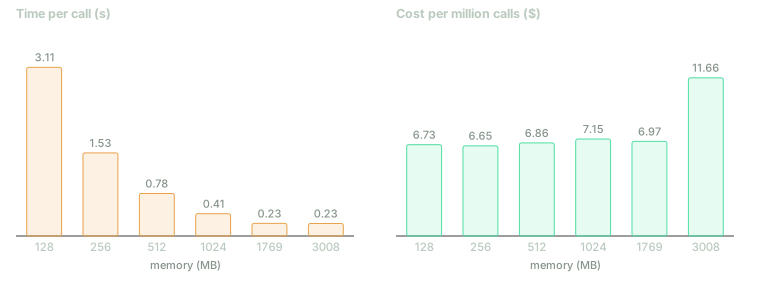
Up to 1769 MB, more memory means more CPU for the same price: the call gets shorter in the same proportion. Beyond that, a single-threaded program gets no faster and pays the difference.
Up to 1769 MB the time falls in the same proportion as the memory rises, so the cost doesn't
change: at 1769 MB the call is 13 times faster and costs the same. Beyond that, Lambda gives you
more than one vCPU, but my program is single-threaded and can't use the extra, so it takes just as
long and costs 70% more. Oddly, Python sees two processors at every memory size (os.cpu_count()
returns 2): Lambda doesn't take processors away, it limits how much of their time you can use. For
reference, a single core of the Core i5-6300U in my laptop does the same work in 0.29 s, and at
128 MB Lambda takes eleven times longer. According to /proc/cpuinfo, what's underneath is an
Intel Xeon at 2.5 GHz, with no further detail. And one quirk of a new account: it wouldn't let me
go above 3008 MB, although Lambda's maximum is 10,240.
What's billed is wall-clock time, not CPU time. The function from the start, sleeping for five
seconds with espera=5, was billed for 5,003 ms without using the processor. If a function waits
for an answer from a database or a language model, which can take twenty seconds, you pay for every
second of that waiting.
What changes in your code
A machine that doesn't remember
The llamadas variable from the start works as a counter for as long as the instance lives, which
is why the second request saw a 2. But with ten instances there are ten counters, each keeping its
own tally, and after a few minutes without traffic they all disappear. The same goes for the
/tmp directory, the only place a function can write: it survives between requests to the same
instance and dies with it.
So anything that has to last (an order, a session, a real counter) goes outside the function, in a
database, an external cache or a file store such as S3. Global variables and /tmp can serve as a
cache to avoid repeating work, but never as the only place a piece of data lives.
Work left over after responding
On a server it's normal to reply straight away and finish the work afterwards in another thread,
such as sending an email or recording a statistic. On Lambda that doesn't work, because as soon as
the function responds, the instance freezes with the thread half done. This function
(congela/lambda_function.py;
congela means "freezes") starts a thread, tarea ("task"), that records the time in marcas
("marks") every 0.1 s for two seconds, and responds without waiting for it:
def tarea():
    for _ in range(20):
        time.sleep(0.1)
        marcas.append(time.time())
I call the function, wait ten seconds and ask it for the timestamps. The first should have been recorded 0.1 s after the task started. In all three runs it was recorded 10.3 s after: the thread spent the ten seconds frozen and carried on only when the second request thawed the instance. If no other request had come, it would never have finished. The rule is simple: anything that isn't done by the time you respond may never get done. Either you finish it before responding, or you leave it in a queue for another function to pick up.
At least once
I invoked a function that always fails, asynchronously (falla/lambda_function.py; falla means "fails"). Lambda ran it three times with the same request ID: the second run came 62 s after the first, and the third 106 s after the second (66 and 119 s in another run). That matches the documentation: two retries, one and two minutes apart. The documentation also adds something more awkward: even if the function never fails, it can receive the same event more than once, because Lambda's internal queue doesn't guarantee otherwise.
So a function that reacts to events has to be idempotent: running it twice with the same event must leave things exactly as running it once would. If the function charges for an order, the second attempt mustn't charge again. The usual approach is to record the ID of every processed event in the database, with a constraint that prevents storing the same ID twice, and to check it before acting.
The database doesn't scale the same way
An application on a server opens a handful of connections to its database and shares them among all its requests (a connection pool). On Lambda, each instance is a separate process and opens its own. A thousand instances at once means a thousand connections, and by default PostgreSQL accepts only a hundred. The scaling that does so much for the function knocks over the database.
There are three ways out. One is a middleman that shares a few real connections among many instances, such as RDS Proxy or PgBouncer. Another is a database you talk to over HTTP rather than through a persistent connection, such as DynamoDB. The third is to cap how many instances the function can have, at the cost of rejecting requests at peak times.
Limits
An invocation can last fifteen minutes at most. A synchronous request and its response can't exceed
6 MB each. The Init has ten seconds to finish. A function can't accept connections, only events,
so it can't hold a WebSocket open (a connection the server uses to push data to the browser
whenever it likes) or act as a game server. Debugging is harder, because there's no machine to log
into, only logs scattered across instances. And while the code moves easily to another provider,
what surrounds it (the triggers, the permissions, the queues) doesn't, and that's what ties you to
the platform.
What it costs, and where the curves cross
Using Ireland's prices, I compared Lambda with the smallest server it makes sense to compare it
with: an EC2 c7g.medium, with one vCPU of a
Graviton3 processor and 2 GB, and no CPU credits to run out. Running all month, it costs $28.32.
But a lone server takes everything down with it when it fails, so in production the sensible setup
is two of them plus a load balancer to share out the requests: $80.88 a month. Here are
the calculations, leaving out the free tier:
| Request type | Cost per million on Lambda ($) | Costs the same as one server at… | … as two and a load balancer at… |
|---|---|---|---|
| Light (20 ms, 128 MB) | 0.24 | 45 requests/s | 127 requests/s |
| Typical (100 ms, 512 MB) | 1.03 | 10 requests/s | 30 requests/s |
| Heavy (1 s, 1769 MB) | 28.99 | 0.4 requests/s | 1.1 requests/s |
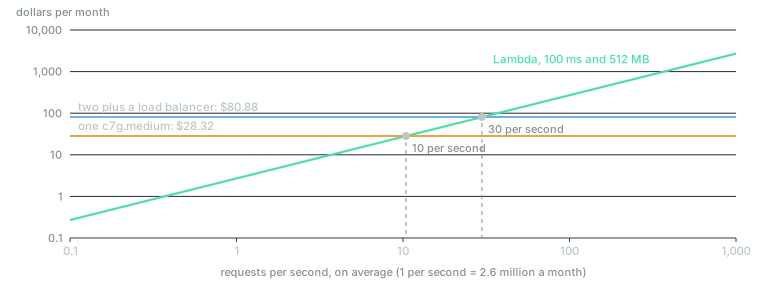
Below the crossing point, Lambda wins; above it, the server does. With low or spiky traffic the server loses by a mile; with high, steady traffic it wins by a mile.
The figure that sums it up is a different one: one vCPU kept busy for an hour costs $0.104 on
Lambda and $0.039 on the c7g.medium, 2.7 times less. For CPU-bound work, Lambda pays off as
long as a server would be busy less than 37% of the time (with two servers and a load balancer, the
threshold is considerably higher). For work that mostly waits, the picture is worse for Lambda: a
server handles hundreds of waiting requests with a single vCPU, while Lambda bills every wait in a
separate instance.
The Lambda bill isn't only Lambda. API Gateway costs $3.50 per million requests in its full version ($1.11 in the simple one), which is more than the function itself in the light case; Function URLs are free, but they do less. Logs cost $0.57 per GB, and a function that writes a lot to them can pay more for that than for running. Then again, the server's bill isn't only the server either: someone updates it, monitors it and gets woken up when it falls over, and those hours don't appear in the table.
The case most often cited against serverless is Prime Video's. In 2023 the team explained that their system for monitoring the quality of video streams, built with Step Functions (AWS's function orchestrator), Lambda and S3, could handle only 5% of the expected load and cost too much: it made several orchestrator transitions for every second of video and passed frames between functions through S3. They moved everything into a single process running in containers, and the cost fell by 90%. That isn't proof that serverless doesn't work. It's exactly the kind of case where it doesn't: constant, intensive work, with many steps passing large amounts of data to one another.
What came after Lambda
Almost everything AWS has added since 2014 has been aimed at lifting limits or hiding the cold
start. In 2018, the maximum run time of a function went from five minutes to fifteen. In 2019 came
provisioned concurrency: paying to keep a number of instances always ready, which means paying
for idle capacity again in exchange for no cold starts. In 2020, billing went from 100 ms slices to
single milliseconds, and functions could be packaged as containers of up to 10 GB. In 2024,
SnapStart reached Python: Lambda
runs the Init once, saves a snapshot of the prepared virtual machine's memory, and starts new
instances from that snapshot.
Meanwhile, the idea spread beyond functions. In 2019 Google launched Cloud Run, which brings the model to whole containers, each serving many requests at once. Databases learnt to bill by use and to scale down to zero.
And over the last year, Lambda itself has been taking on some of the traits of servers. Lambda Managed Instances (November 2025) runs functions on EC2 machines that you choose, each serving several requests at once, and is billed like EC2 plus a 15% surcharge. Durable functions (December 2025) save a function's progress so that it can wait for up to a year without being billed. And on 12 October 2026, AWS unveiled Lambda Web Functions: your code is an ordinary HTTP server listening on a port, each instance serves 64 requests at once by default (up to 128), and you're billed for active CPU time, not for waiting. That was when AWS renamed the classic functions Event Functions.
The two traits that defined Lambda in 2014, one request per instance and billing for wall-clock time, are now optional. What remains of serverless, in all its forms, is the definition: you don't choose machines, you pay by use and you scale to zero. Serverless is ceasing to be a way of programming and becoming a way of operating and billing.
When to choose each
| If your workload… | Better | Why |
|---|---|---|
| has spikes, or goes hours without traffic | Serverless | You scale to zero and don't pay for the wait |
| reacts to events: an uploaded file, a message, a notification from another service, a scheduled task | Serverless | It's what it was designed for |
| is an internal tool, a prototype or a low-traffic project | Serverless | With the free tier, it often costs nothing |
| is run by a small team with nobody to operate machines | Serverless | There's no operating system to patch |
| is high and steady | Server or containers | A vCPU-hour costs almost three times less |
| spends most of its time waiting on other services | Server, or a platform that bills active CPU | Event Functions bill the wait |
| needs low latency on every request, no exceptions | Server, or provisioned concurrency | Cold starts |
| keeps connections open or lots of state in memory | Server | Instances don't accept connections and die on their own |
| runs for longer than fifteen minutes | Server, queues with workers, or durable functions | The invocation limit |
Most real systems mix the two: a server or a few containers for the main traffic, and functions for whatever arrives now and then, such as resizing the images users upload or sending the weekly digest.
What to take away
If you remember only one thing, make it this: serverless doesn't eliminate servers, it eliminates your decision about them. You pay only for what you use, in exchange for each instance possibly being born in the middle of a request and vanishing a few minutes after it runs out of work. Everything you need to know to use it well follows from those two halves.
And if you take away three more, make them practical ones.
Measure what you do at start-up. Every import at the top of the file is paid for on every new
instance: 0.25 s for boto3, nearly 3 s for pandas. Import only what you use, and if you package
large Python libraries, compile their .pyc files by hash.
Write every function as if it were going to run twice and forget everything. Both can happen.
Keep nothing important in memory or in /tmp, leave nothing half done after responding, and check
every event before acting.
Do the sums with utilisation, not request counts. If one of your vCPUs would be busy more than a third of the time, or if your functions spend most of their time waiting, a server works out cheaper. Below that, Lambda wins by a mile.
Thirty years ago, CGI started a process per request, and FastCGI kept it alive to avoid paying for the start. Lambda runs the same calculation again, now with virtual machines, and leaves it to the provider. The servers are still there; what's gone is anyone on your team who has to decide how many.